先查询
SELECT CONCAT('KILL ', id, ';') AS kill_statement
FROM information_schema.processlist
WHERE command = 'Sleep' AND time > 50;
后复制 运行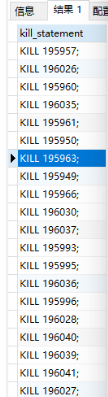
然后把kill复制出来运行
先查询
SELECT CONCAT('KILL ', id, ';') AS kill_statement
FROM information_schema.processlist
WHERE command = 'Sleep' AND time > 50;后复制 运行
然后把kill复制出来运行
这样假如程序写的不够完善会出现大量sleep超过几千的进程,这样会引起性能变差,链接中断,
所以建议如下修改.
全局和会话变量一起改 具体多少变量自己决定。
show VARIABLES like '%timeout%' ;
set  wait_timeout=600;
set  interactive_timeout=600;
set global wait_timeout=600;
set global interactive_timeout=600;
show VARIABLES like '%timeout%' ;
show global VARIABLES like '%timeout%' ;按IP来排序
select client_ip,count(client_ip) as client_num from (select substring_index(host,':' ,1) as client_ip from information_schema.processlist ) as connect_info group by client_ip order by client_num desc;显示线程数
show status like 'thread%';显示所有线程
SHOW FULL PROCESSLIST;问题 配置代码无法解析
答 npm版本高对某些事情比npm6.x更严格
解决方案:
降级npm到6版本行以下命令
npx -p npm@6 npm i --legacy-peer-deps
报错:Error: error:0308010C:digital envelope routines::unsupported
运行VUE项目(npm run dev )时候跳出的报错,nodeJs V17版本后会出现这样的问题,解决办法就是降级或者使用下面方法
解决方案:
方案1:进入项目后打开终端(CMD),直接输入
Linux & Mac OS:
export NODE_OPTIONS=--openssl-legacy-provider
Windows:
set NODE_OPTIONS=--openssl-legacy-provider
或者直接在VUE配置文件中修改(package.json) 增加
修改后
 "scripts": {
    "dev": "set NODE_OPTIONS=--openssl-legacy-provider & vue-cli-service serve",
    "build:prod": "vue-cli-service build",
    "build:stage": "vue-cli-service build --mode staging",
    "preview": "node build/index.js --preview",
    "lint": "eslint --ext .js,.vue src"
  },
修改前
 "scripts": {
    "dev": " vue-cli-service serve",
    "build:prod": "vue-cli-service build",
    "build:stage": "vue-cli-service build --mode staging",
    "preview": "node build/index.js --preview",
    "lint": "eslint --ext .js,.vue src"
  },
亲测有效。